
Heatmaps are a powerful tool for analyzing user interactions on websites. By visually representing where users click, scroll, and engage using color-coded data, heatmaps provide invaluable insights into user behavior. This information is crucial for identifying performance strengths and areas needing improvement, making heatmaps an essential tool for optimizing user experience and website functionality.
Understanding Heatmaps
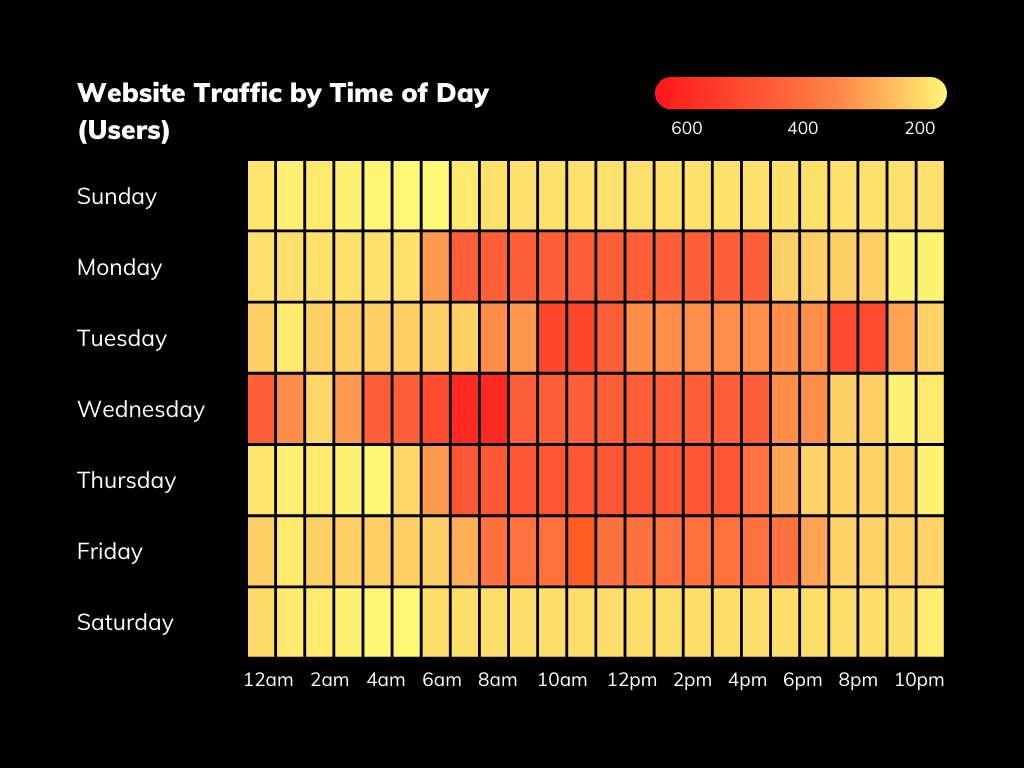
Heatmaps use a gradient of colors to show the intensity of user interactions on different parts of a webpage. Areas with high engagement are typically shown in warm colors (red, orange, yellow), while areas with less interaction appear in cooler colors (blue, green). This visual representation makes it easy to understand user behavior at a glance.
Benefits of Using Heatmaps
1. Identify User Behavior Patterns: Heatmaps help you understand how users navigate your site, where they click the most, and which areas are ignored. This can reveal valuable information about what draws users’ attention and what might be causing friction.
2. Optimize Layout and Design: By seeing which elements of your site are most and least engaging, you can make informed decisions about where to place important content, calls to action, and navigation elements.
3. Improve Conversion Rates: Understanding where users are getting stuck or dropping off can help you optimize the user journey, leading to higher conversion rates.
4. Enhance User Experience: By identifying areas of your site that are confusing or frustrating for users, you can make necessary adjustments to improve overall user satisfaction and engagement.
Integrating Third-Party Tools with Google Analytics
To comprehensively monitor and analyze user interactions on your website, you need to use third-party tools that integrate seamlessly with Google Analytics. Here are some of the best options available:
1. Hotjar
Hotjar offers a range of features, including heatmaps, session recordings, and feedback polls. Its intuitive interface and powerful analytics make it a favorite among marketers and UX designers.
2. FullStory
FullStory captures detailed session recordings and provides in-depth analysis of user interactions. Its robust search and filtering capabilities help you pinpoint specific user behaviors and issues.
3. Crazy Egg
Crazy Egg provides heatmaps, scroll maps, and A/B testing tools to help you understand user behavior and test different design variations to see what works best.
4. Mouseflow
Mouseflow offers heatmaps, session recordings, funnels, and form analytics. It helps you track user interactions in real-time and understand how users navigate through your site.
5. Contentsquare
Contentsquare provides advanced analytics and heatmaps to help you understand user behavior and improve your site’s performance. Its AI-powered insights can identify areas of improvement automatically.
6. Plerdy
Plerdy offers heatmaps, pop-up forms, and SEO checklists. It provides comprehensive data on user interactions, helping you optimize both UX and SEO.
7. Lucky Orange
Lucky Orange provides heatmaps, session recordings, chat, and surveys. Its suite of tools allows you to see how users interact with your site and gather direct feedback from them.
8. Smartlook
Smartlook offers heatmaps and session recordings with advanced filtering options. It helps you understand user behavior and identify issues in the user journey.
9. VWO (Visual Website Optimizer)
VWO provides heatmaps, A/B testing, and user surveys. It helps you optimize your site based on data-driven insights and user feedback.
10. Glassbox
Glassbox offers detailed session recordings and heatmaps, along with advanced analytics capabilities. It provides comprehensive insights into user behavior and site performance.
Conclusion
Integrating heatmaps with your website’s analytics provides a wealth of information about how users interact with your site. By using these powerful tools, you can optimize your website’s design, improve user experience, and increase conversion rates. Whether you choose Hotjar, FullStory, Crazy Egg, or any other tool from the list, you’ll be equipped with the insights needed to make data-driven decisions and enhance your website’s performance.
 Lead Generation Toolkit
You must be logged in to post a comment.